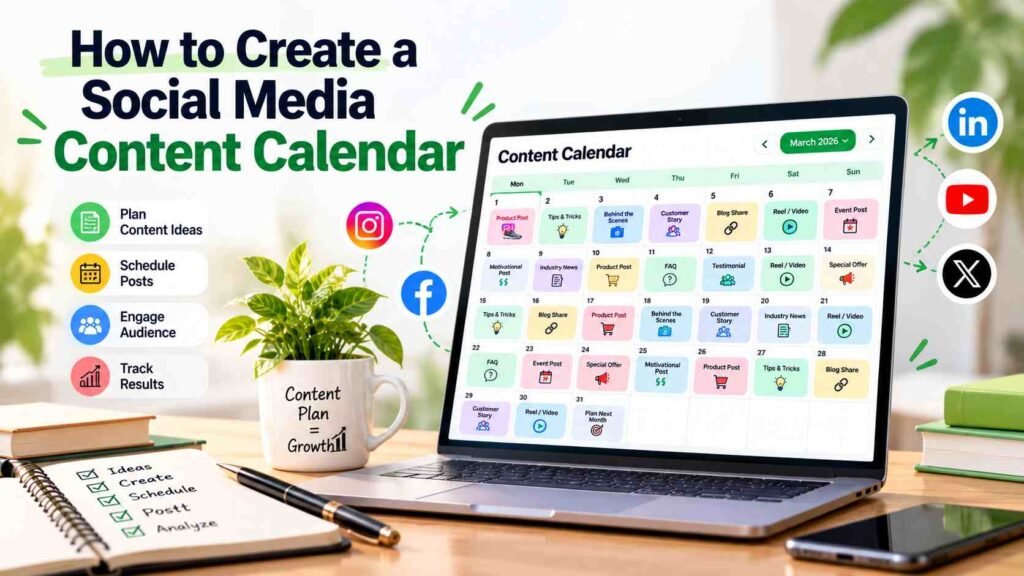
Posting on social media without a plan gets messy fast. One week you’re active, the next week it’s silent. That kind of inconsistency just confuses your audience and makes it tough to track what’s actually working.
Actually, building a content calendar is about making things easier for yourself. You plan campaigns, schedule posts, and keep things consistent. No more scrambling every morning to figure out what to post. You prep in advance and make sure every post has a real purpose.
Doesn’t matter if you’re running your own business or handling multiple clients-a simple calendar makes content creation and coordination way less stressful.
What Is a Social Media Content Calendar and Why Does It Matter?
A content calendar is just a simple plan for what you’ll post, where, and when. You can add captions, images, campaign notes, hashtags, dates-whatever you need to keep things moving.
It cuts down last-minute chaos and helps you focus on content that actually supports your business goals.
Here are three important benefits.
1. Maintain a Consistent Posting Schedule
Consistency matters. Your audience knows when to expect updates, and you avoid dumping all your content in one go. A calendar spreads things out and keeps you on track.
For example, a business might share educational content on Monday, a customer success story on Wednesday, and a product-focused post on Friday. The schedule can be adjusted according to audience behaviour and available resources.
2. Align Content With Business Goals
Every post should have a purpose. Some posts build awareness, others educate potential customers, and some encourage enquiries or purchases.
When you plan ahead, you avoid turning your feed into a sales pitch. You get a good mix of content that actually helps your audience.
3. Improve Team Collaboration
A shared calendar keeps everyone on the same page-writers, designers, editors, whoever. You can see deadlines, who’s doing what, and what’s coming up next.
It cuts down confusion and helps you spot missing stuff before it’s too late.
How to Create a Social Media Content Calendar Step by Step
You don’t need fancy tools to start. A basic spreadsheet works. Upgrade only when you actually need more features.
4. Define Your Social Media Marketing Goals
First, figure out what you want from social media. Is it more leads, more website visits, or just building a community? Be clear about it.
Connect each goal to a measurable indicator. For example, track reach for awareness, link clicks for website traffic, and qualified enquiries for lead generation.
Clear objectives help you decide which content deserves priority.
5. Understand Your Target Audience
Study the questions, challenges, interests, and preferences of your ideal customers. Review comments, direct messages, customer enquiries, website analytics, and previous post performance to identify useful topics.
A healthcare brand might publish educational information, while a manufacturing company could explain product applications, technical specifications, and industry challenges.
Understanding the audience makes content more relevant and reduces the risk of publishing posts that attract attention but offer little business value.
6. Select the Right Social Media Platforms
You do not need to publish on every social media platform. Choose channels that match your audience and content capabilities.
- Instagram: Reels, carousels, visual storytelling, and brand awareness.
- Facebook: Community updates, local business communication, and promotional campaigns.
- LinkedIn: B2B insights, professional expertise, and business networking.
- YouTube: Tutorials, product demonstrations, interviews, and educational videos.
Your calendar should reflect the strengths of each platform instead of copying every post everywhere without adaptation.
For additional support, explore SpaceKey Digital and its digital marketing solutions.
7. Create Content Pillars for Consistent Ideas
Content pillars are recurring themes that guide what your brand publishes. They make brainstorming easier and help maintain a balanced content strategy.
Common content pillars include:
- Educational tips and industry insights.
- Product or service explanations.
- Customer stories and testimonials.
- Behind-the-scenes content.
- Frequently asked questions.
- Offers, announcements, and campaigns.
For example, a digital marketing agency can share SEO tips, advertising insights, campaign lessons, client success stories, and practical website improvement advice.
8. Choose Content Formats and Publishing Frequency
Once your themes are defined, decide how to present them. A single topic can become a carousel, short video, infographic, story, or long-form post.
Pick a posting schedule you can actually stick to. Three solid posts a week is better than trying to post daily and burning out.
Check your analytics to see what formats actually work. Treat your first schedule as a test and tweak it once you have real data.
9. Build Your Calendar With the Essential Details
Set up a simple spreadsheet or use a project management tool. Add whatever details you need to take a post from idea to published.
Calendar field | Purpose |
Publishing date | Establishes the deadline |
Platform | Identifies where the post will appear |
Content pillar | Maintains topic balance |
Topic and hook | Defines the main message |
Caption and CTA | Guides the audience’s next action |
Creative asset | Links the image or video |
Owner and status | Tracks responsibility and approvals |
Performance | Records results after publication |
These fields provide a clear workflow without making the calendar unnecessarily complicated.
10. Review, Schedule, and Improve Content
Always review your posts before they go live. Check facts, spelling, branding, visuals, links, and your call to action.
Schedule your approved posts using built-in tools or whatever scheduler you like. Leave some space for last-minute updates or important news.
After publishing, review performance regularly. Identify which topics attract relevant engagement, which posts generate website visits, and which campaigns contribute to enquiries. Use these findings to improve the next planning cycle.
What Tools and Best Practices Make Content Planning Easier?
The best workflow is the one you’ll actually use. Start simple. Only add automation if it really saves you time or fixes a problem.
Use Tools That Match Your Workflow
Google Sheets and Excel work well for straightforward calendars. Scheduling platforms can help manage multiple accounts, while project management tools can organize approvals, deadlines, and creative tasks.
Pick tools based on how much you post, your team size, your budget, and what you actually need to report.
Prepare Content in Batches
Batching just means doing similar tasks together. Brainstorm topics in one go, write captions in another, and design visuals separately.
This saves time and helps you stay ahead of deadlines. Keep a few evergreen posts ready for busy weeks.
Adapt Content to Each Platform
Repurposing is smart, but don’t just post the same thing everywhere. Turn a LinkedIn post into an Instagram carousel or a short video, but tweak it for each platform.
Measure Results Beyond Likes
Likes and comments are nice, but they’re not the whole story. Track reach, saves, shares, clicks, leads, conversions-whatever matches your goals.
Use these measurements to identify what deserves more investment. Avoid assuming that one successful post automatically represents a repeatable strategy.
If you want to connect your content planning with SEO, ads, or lead generation, get help from someone who’s done it before. It saves time and avoids mistakes.
Conclusion
Turn Social Media Planning Into a Repeatable Process
A social media calendar works best when it connects audience needs, business objectives, creative execution, and performance analysis. Begin with clear goals, define your content pillars, select suitable platforms, and organize publishing tasks in a shared document.
The point isn’t to fill every date with a post. It’s to build a process you can actually stick to, so you publish useful content regularly and keep getting better at it.
If you need help with content strategy, social media, or lead generation, just ask.
Contact us today Partner with SpaceKey Digital to grow your business with expert digital marketing and social media strategies.
FAQs
- How to Create a Social Media Content Calendar for Beginners?
To learn how to create a social media content calendar, start by selecting one or two platforms, defining your marketing goals, choosing three to five content pillars, and planning posts for the next two to four weeks. Use a spreadsheet to track dates, captions, creative assets, and publishing status.
- Which Tools Are Best for Creating a Social Media Content Calendar?
Google Sheets and Excel are suitable for simple planning. Social media scheduling platforms and project management tools are useful for managing multiple accounts, approvals, and reporting. The best option depends on your budget, team size, and workflow.
- How Often Should a Social Media Content Calendar Be Updated?
Review your calendar weekly to handle immediate changes and monthly to evaluate broader performance. Update it whenever business priorities, campaign schedules, audience interests, or platform requirements change.
- How Far in Advance Should You Plan Social Media Content?
Planning two to four weeks ahead works well for many businesses. Larger campaigns may require longer preparation, while news-related or trend-driven content needs flexibility. Keep some space available for timely posts and customer interactions.
- Can a Social Media Content Calendar Improve Business Results?
Yes, a well-managed calendar can improve consistency, coordination, and strategic alignment. When you understand how to create a social media content calendar around measurable goals, you can identify successful content patterns and make better decisions about future campaigns. Results still depend on content quality, audience relevance, distribution, and execution.