
Most marketing teams end up doing the same things over and over-sending follow-up emails, sorting leads, updating records, sending reminders, and moving people through the funnel. It eats up a lot of time.
Automation can take care of a lot of that manual work, but it’s not about automating everything just for the sake of it. The real value is when automation helps you send the right message to the right people at the right time. That way, your team can actually focus on strategy and creative work instead of just ticking boxes.
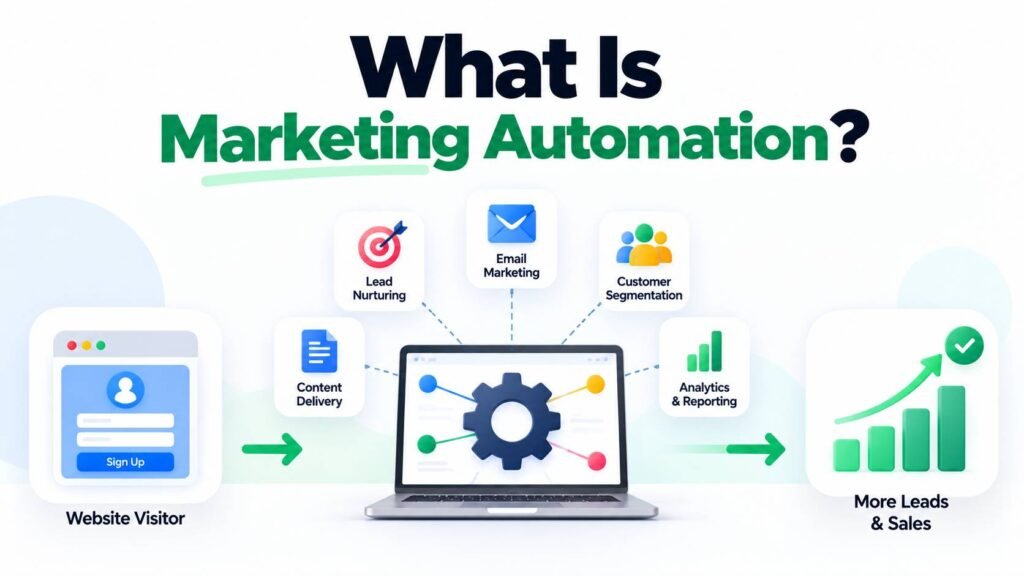
So what is marketing automation, really? It’s just using software and workflows to handle repetitive marketing tasks based on what your customers do or the info you have about them.
What Is Marketing Automation And How Does It Work?
Basically, marketing automation is a system that triggers actions automatically when certain things happen-like someone fills out a form or clicks a link.
For example, imagine someone downloads a guide from your website. Instead of a marketer manually sending every follow-up message, an automation workflow can:
- Record the contact in a CRM.
- Add the person to a relevant audience.
- Send a confirmation email.
- Wait for a defined period.
- Send educational content.
- Track whether the person interacts.
- Notify the sales team when the lead reaches a certain qualification stage.
The workflow continues according to the rules established by the marketing team.
Common Marketing Automation Activities
Marketing automation can support several areas, including:
- Email campaigns
- Lead nurturing
- Customer segmentation
- Welcome sequences
- Abandoned-cart reminders
- Lead scoring
- CRM updates
- Webinar reminders
- Follow-up campaigns
- Customer re-engagement
- Internal notifications
- Personalised website experiences
The setup you need depends on your business, your audience, your tech stack, and how your customer journey actually works.
Automation Is More Than Scheduled Emails
A lot of people think automation just means scheduling emails. That’s only a small part of it.
Email is just one piece. These days, automation can connect a bunch of different systems and trigger all kinds of actions.
For example, a website form can trigger a CRM update, email sequence, sales notification, audience segmentation, and reporting event.
So you end up with a connected workflow, not just a one-off automated message.
Why Is Marketing Automation Important For Businesses?
The real value of automation is in consistency, timing, scalability, and making better use of your team’s time.
1. Reduces Repetitive Work
Marketing teams frequently perform tasks that follow predictable patterns.
If you’re manually checking every new lead or sending every welcome message, that’s time you could use for strategy, content, or actually improving your campaigns.
Automation handles repeatable actions according to predefined rules.
2. Improves Lead Nurturing
Not every prospect is ready to buy immediately.
A person may download an ebook today but need several weeks of research before contacting a sales team. Sending useful information at appropriate stages can keep the brand relevant during that period.
A lead-nurturing workflow might provide:
- Educational content
- Case studies
- Product information
- FAQs
- Customer stories
- Consultation opportunities
The goal isn’t to spam people. It’s to send them useful info based on where they are in the journey and what they’ve done so far.
3. Enables Better Personalisation
Automation and personalisation can work together.
Instead of sending exactly the same communication to every contact, businesses can create segments based on information such as:
- Industry
- Location
- Previous interactions
- Product interest
- Purchase history
- Website behaviour
- Lead stage
For example, if you’re a B2B company, you might set up different workflows for business owners, marketing managers, or decision-makers at bigger companies.
4. Helps Marketing And Sales Work Together
Lead handoff is often a weak point in the customer journey.
A marketing automation system can notify sales when a lead completes a specific action or reaches a defined qualification threshold.
This does not mean every automated score represents a sales-ready prospect. Teams should establish clear definitions and validate the quality of leads with actual sales outcomes.
5. Makes Campaigns More Scalable
A manual process might work when you have 50 contacts, but it falls apart when you’re dealing with thousands.
Automation lets you run the same workflows for a much bigger audience without needing someone to do everything by hand.
For businesses building a broader acquisition strategy, Best Digital Marketing Services in Hyderabad can be useful when considering how automation fits alongside SEO, paid advertising, content, social media, and lead generation.
Which Marketing Automation Workflows Can You Create?
A useful automation strategy begins with the customer journey rather than the software.
Before you build any workflow, figure out what your customer is doing, what they need next, and what should happen after that.
Welcome Workflow
When someone subscribes to a newsletter or registers for an offer, a welcome workflow can introduce the brand and explain what the subscriber can expect.
A simple sequence might include:
Signup → Welcome Message → Educational Content → Relevant Offer → Follow-Up
Lead-Nurturing Workflow
Lead nurturing is useful when prospects need more information before making a decision.
For example, someone interested in website development might initially receive an educational guide, followed by a case study, service information, and eventually a consultation invitation.
The timing and content should reflect the prospect’s behaviour rather than following an arbitrary sequence.
Abandoned-Cart Workflow
E-commerce businesses can use automation to remind customers when they leave products in their shopping cart without completing the purchase.
Depending on your brand and how you interact with customers, you might send product info, a reminder, or even support details.
Re-Engagement Workflow
Some subscribers stop interacting with a brand.
A re-engagement workflow can identify inactive contacts and attempt to bring them back with useful content or an opportunity to update their preferences.
If people still don’t engage, it’s better to cut back on messages instead of spamming them.
Post-Purchase Workflow
Automation does not have to stop after a sale.
Post-purchase workflows can support:
- Order information
- Product education
- Feedback requests
- Review requests
- Support information
- Cross-sell opportunities
- Loyalty communication
The goal should be to improve the customer experience, not simply increase the number of promotional messages.
How Do You Build An Effective Marketing Automation Strategy?
So, the real question isn’t about software features. It’s about how you use automation as part of your overall strategy.
A successful implementation usually starts with the customer journey.
Step 1: Define A Clear Objective
Start with one clear business problem you want to solve.
For example:
- Increase qualified leads
- Improve lead follow-up
- Reduce manual email work
- Increase repeat purchases
- Improve webinar registrations
- Re-engage inactive customers
When you have a clear goal, it’s much easier to design and measure your workflow.
Step 2: Map The Customer Journey
Figure out the main stages your customer goes through.
A typical B2B journey might be:
Awareness → Research → Lead → Qualification → Consultation → Proposal → Customer
Each stage probably needs different content and communication.
Step 3: Define Triggers
A trigger is the event that starts an automation.
Examples include:
- Form submission
- Email signup
- Product purchase
- Page visit
- Webinar registration
- Download
- Trial activation
- Change in lead status
Only set up triggers that actually matter for your business. Don’t just use every option your platform gives you.
Step 4: Create Relevant Actions
Once the trigger occurs, determine what should happen next.
Actions could include:
- Send an email
- Update CRM information
- Assign a lead
- Add a tag
- Change a segment
- Notify a salesperson
- Start another workflow
Keep things logical and skip any steps that don’t add value.
Step 5: Measure Results
Track metrics that relate to the original objective.
Depending on the workflow, these may include:
- Open rates
- Click-through rates
- Lead-to-customer conversion
- Qualified leads
- Revenue
- Repeat purchases
- Unsubscribe rates
- Workflow completion
- Sales response time
For SEO-driven businesses, automation can complement organic acquisition rather than replace it. Businesses can explore the best SEO Services in Hyderabad when planning how search visibility and lead nurturing can work together.
Common Marketing Automation Mistakes
Automation can backfire if you focus on sending more messages instead of making them relevant.
Common mistakes include:
- Creating too many workflows
- Sending excessive emails
- Using generic messaging
- Ignoring customer preferences
- Building workflows without clear goals
- Failing to test automation
- Using inaccurate customer data
- Treating lead scores as guaranteed buying intent
- Forgetting to review old workflows
- Measuring opens and clicks without business outcomes
Another important consideration is data privacy and consent. Businesses should follow applicable privacy requirements and provide appropriate choices for communication preferences.
Automation should make the customer journey feel more personal, not robotic.
Ready To Build A Smarter Marketing Workflow?
Automation works best when it’s tied to a clear customer journey, good content, solid data, and real business goals. Let the tech handle the repetitive stuff, but keep your team focused on strategy, messaging, testing, and making sure customers have a good experience.
If you want to connect SEO, content, paid advertising, social media, websites, lead generation, and automation into a more structured digital strategy,
Connect us today for a strategy tailored to your goals, audience, and growth opportunities.
FAQs
- What Is Marketing Automation And Why Is It Important?
What Is Marketing Automation? It is the use of software and predefined workflows to automate repetitive marketing activities. It can help businesses improve consistency, nurture leads, personalise communication, and reduce manual work.
- What Is Marketing Automation In Digital Marketing?
What Is Marketing Automation? In digital marketing, it connects customer actions with predefined responses across channels such as email, websites, CRM systems, advertising audiences, and lead-generation workflows.
- What Is Marketing Automation Used For?
What Is Marketing Automation? It can be used for lead nurturing, welcome campaigns, customer segmentation, abandoned-cart reminders, re-engagement, post-purchase communication, notifications, and other repeatable marketing processes.
- What Is Marketing Automation For Small Businesses?
What Is Marketing Automation? For small businesses, it can reduce repetitive tasks and provide structured follow-up without requiring a large marketing team. The best starting point is usually one clearly defined workflow connected to an important business goal.
- What Is Marketing Automation Compared With Email Marketing?
What Is Marketing Automation? is broader than email marketing. Email can be one part of an automation system, while automation may also connect CRM updates, segmentation, lead scoring, website behaviour, notifications, advertising audiences, and other actions.